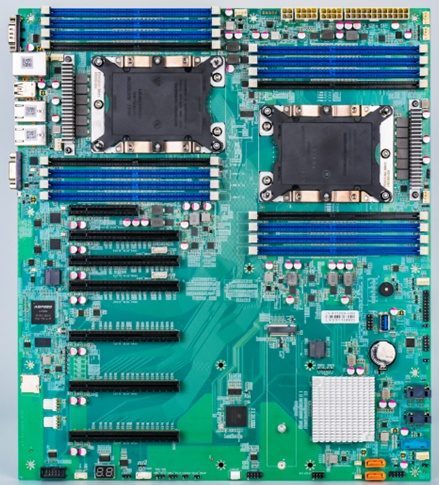
Pick the motherboard first, then the chassis — reversing the order is the most common cause of rework. Form factor, slot orientation, cooler clearance, and PSU placement, checked one by one.
The first step in choosing a chassis is not browsing enclosures — it is confirming the motherboard. Once the board is fixed, the chassis's minimum size, slot count, and cooling space follow automatically. Choosing the chassis first and the board second is the most common cause of selection rework. This article walks through the checks, one by one.
【Form factor is a hard constraint】
Common server/IPC motherboard footprints: E-ATX is about 305×330 mm, typical for dual-socket server platforms; ATX is 305×244 mm, the most versatile; Micro-ATX is 244×244 mm, the mainstay of compact builds; Mini-ITX is 170×170 mm, for space-critical edge nodes. A chassis spec sheet reading "supports E-ATX / ATX / Micro ATX" means E-ATX is the ceiling — anything smaller fits, but verify standoff availability with the supplier, because Mini-ITX hole patterns are not always present in small enclosures.
【Slot orientation is easy to overlook】
The direction and count of the motherboard's PCIe slots determine how expansion cards mount. In a 2U chassis the height is limited, so riser adapters turn the slots sideways. Match the chassis's supported slot format (low-profile, full-height, rear-window riser) against your expansion card list: NICs, HBAs, and GPUs each occupy slots at specific heights. Whether "enough slots" is true is not counted on the motherboard — it is counted on the chassis's slot openings.
【Cooler clearance and airflow】
A 2U chassis has roughly 88 mm of internal height; after fans and air ducts, cooler clearance is typically 30–60 mm, so low-profile downdraft coolers are the norm. Tower coolers belong to 4U and above. For high-TDP CPUs, check whether the airflow runs front-to-back or side-to-side, and whether the fans are temperature-controlled. Send the CPU TDP to the supplier for a clearance check before assembly — it beats adding fans afterward.
【PSU and structural details】
Confirm the PSU format: ATX, CRPS redundant, or DC onboard; whether chassis depth accommodates the PSU length. Then verify front-panel I/O (power, UID, alarm LED, USB), whether drive bays match the motherboard's SATA/SAS channel count, and whether the I/O cutout fits the motherboard's rear port layout.
【Suggested check order】
Motherboard form factor → expansion card list → cooler clearance and airflow → PSU and structure. Four steps, and the chassis selection rarely goes wrong. Send us the motherboard model, expansion card list, and CPU model, and we will run the same checks and propose a configuration.